Metamodel
The ArchNGN metamodel is the schema for your model: the categories, types, and relationships that objects in a workspace are allowed to use. It organises architectural elements into four categories: Business, Application, Data, and Technology. This structure gives a consistent way to model how your organisation operates, what software supports it, what data it holds, and what infrastructure runs underneath.
You will find the Metamodel under Model in the left sidebar, alongside Overlays and Frameworks. Governance content (the policies, standards, and decisions that guide your architecture) is not an object category; it is managed separately as records in the Reference Library.
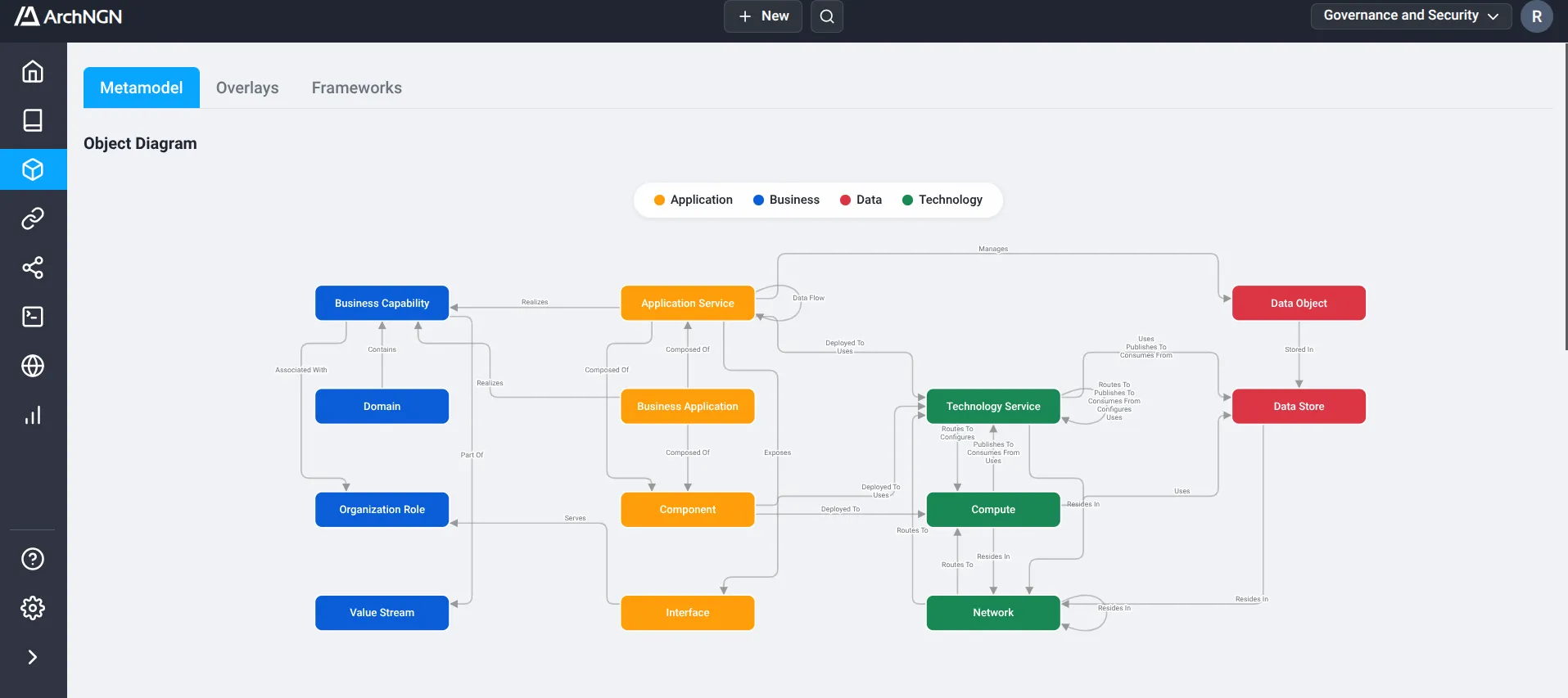
Categories
Section titled “Categories”Business
Section titled “Business”Describes what the business does and how value is delivered, independent of implementation.
| Element | Description |
|---|---|
| Domain | A high-level area of knowledge or activity (e.g., “Payments”, “Logistics”). Primary grouping mechanism for capabilities. |
| Business Capability | Defines what the business does at a functional level, independent of how it is implemented (e.g., “Order Management”). |
| Organization Role | A structural responsibility or job function within the organization (e.g., “Finance Manager”, “DevOps Engineer”). |
| Value Stream | The end-to-end sequence of activities that create value for a customer (e.g., “Order to Cash”). |
Application
Section titled “Application”Describes the software systems that support business operations.
| Element | Description |
|---|---|
| Business Application | A complete software solution or suite providing business functionality, managed as a distinct asset or subscription (e.g., Salesforce, SAP, Microsoft 365). |
| Application Service | A discrete piece of business functionality exposed by a system (e.g., “Payment Processing Service”). |
| Interface | The specific access point or contract for interacting with a service (e.g., “v1 REST API”, “CSV Export”). |
| Component | A deployable unit of software, such as an application binary, library, or container image. |
Describes the logical data entities and where they are persisted.
| Element | Description |
|---|---|
| Data Object | A key logical data entity (e.g., “Customer Record”, “Order Payload”) independent of physical storage. |
| Data Store | A physical repository for persisting data (e.g., “PostgreSQL Database”, “S3 Bucket”). |
Technology
Section titled “Technology”Represents the foundational infrastructure that hosts and runs the Application layer.
| Element | Description |
|---|---|
| Technology Service | A technical capability provided by the infrastructure or cloud platform (e.g., Messaging, AI, Identity, ETL). |
| Compute | Processing resources required to run applications (e.g., “Virtual Machine”, “Kubernetes Cluster”). |
| Network | Communication infrastructure connecting resources (e.g., “VPC”, “Load Balancer”). |
Cross-Category Associations
Section titled “Cross-Category Associations”The value of the metamodel is in the relationships that span categories:
- Top-Down Tracing: Follow a Business Capability to the Application Service that realizes it, then to the Compute it is deployed to.
- Impact Analysis: Understand how retiring a server affects the applications and capabilities that depend on it.
- Governance Linkage: Connect the policies and standards in the Reference Library to the elements they govern.
- Category Filtering: Isolate a category to focus on a subset of relationships.
The Effective Metamodel
Section titled “The Effective Metamodel”The categories and types above are the base metamodel that ships with the platform. Each account also has an effective metamodel: the base plus any Overlays the account has applied.
Overlays let an account extend or restrict the schema to match a recognised framework or its own conventions. When an overlay is applied, the effective metamodel changes everywhere it matters: the type and category pickers in the Repository, the diagram on the Metamodel page, and the schema connectors and workstreams generate against. The Metamodel page always renders the effective metamodel for your account, so what you see reflects the overlays in force.
Related
Section titled “Related”- Overlays: additive and restrictive packages that change the effective metamodel.
- Frameworks: compliance frameworks that audit your model for conformance.
- Reference Library: the policies, standards, decisions, blueprints, and patterns that govern your designs.