Custom policies
A custom policy pack holds your organisation’s own policies as rules ArchNGN can check. You bring the policy documents. ArchNGN drafts a rule for each policy it finds, you review and approve the drafts, and the published pack is checked across every workspace in the account, just like a framework.
Custom packs appear under Settings → Policies, in the Customer Policies section, above the frameworks. Creating, reviewing and publishing a pack, and switching its rules between Advisory and Enforce, needs the policy:manage permission. Account admins have it by default, and it can be added to a custom role.
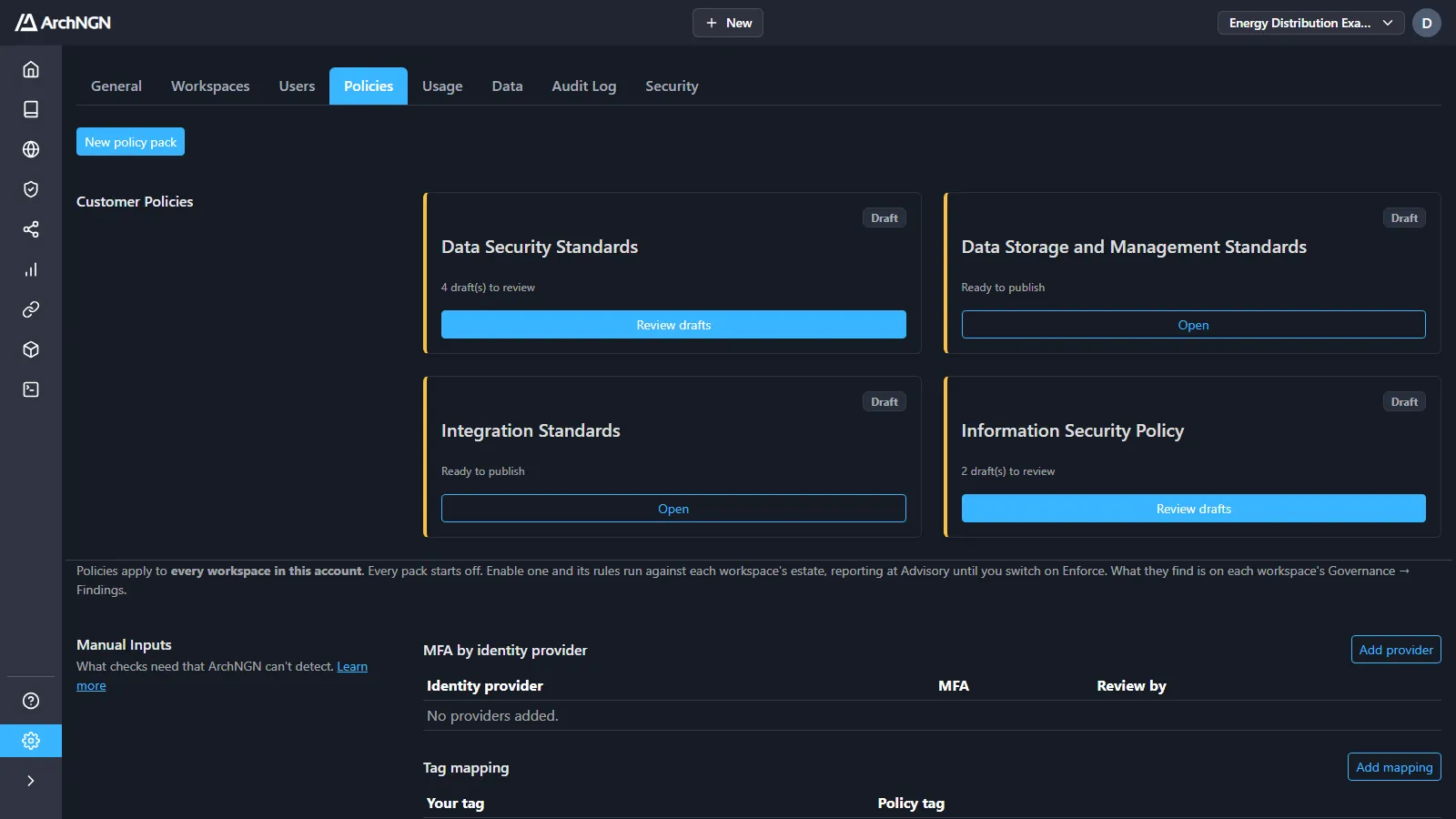
How it works
Section titled “How it works”- Add sources. Upload policy documents, or pick policies, standards and decisions already in your Reference Library.
- Drafting. A background job reads each source, finds the individual policies in it, and proposes a rule for each one.
- Review. You approve, edit or discard each draft. Every draft shows the text it came from and what it would flag in your estate today.
- Publish. The approved rules become version 1.0 of the pack.
- Enable. Turn the pack on, and its rules check every workspace at Advisory.
- Tune. Switch the pack, or single rules, to Enforce once you trust them.
AI is used in step 2 only, to read your documents and propose drafts. Nothing is checked until a person approves it. Once a pack is published, its rules are evaluated by the rules engine, not by AI, so the same object always gets the same answer and nothing is ever blocked on an AI judgement.
Create a pack
Section titled “Create a pack”- Open Settings → Policies and click New policy pack, or choose Policy Pack from + New.
- Give the pack a name, and optionally a description.
- Add at least one source:
- Policy documents: PDF, Word (
.docx,.doc), PowerPoint (.pptx), Excel (.xlsx), Markdown, HTML or plain text. Up to 10 MB each. - Reference Library items: policies, standards and decisions in the active workspace’s Reference Library. Items that a framework or another pack added are not offered.
- Policy documents: PDF, Word (
- Click Draft rules.
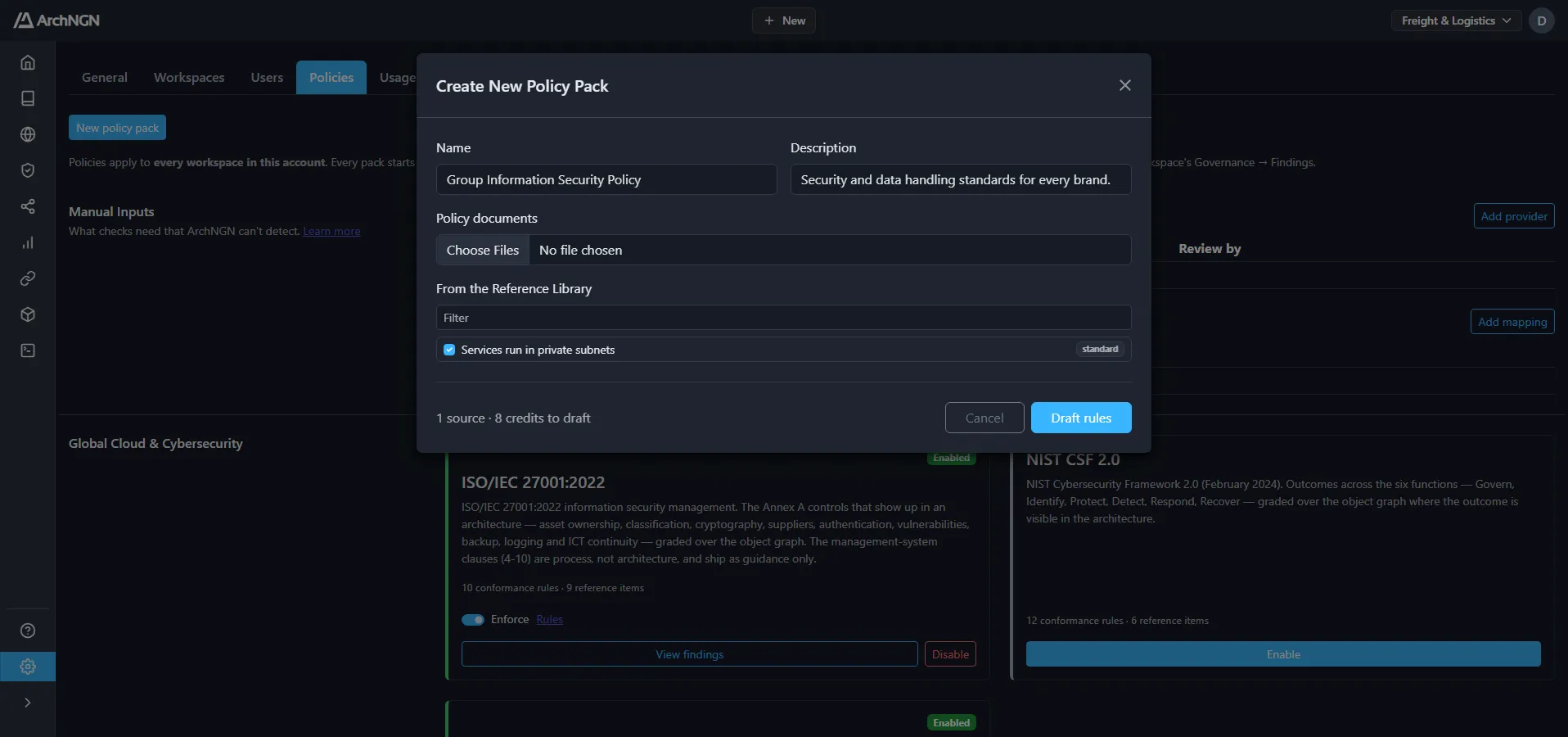
You can draft from up to 20 sources at a time. Drafting costs 8 credits per source, and the dialog shows the total before you start. The job appears under Jobs → Account as Policy Drafting, and the pack opens on its review screen. Drafts appear there as each source finishes.
To add more sources to a pack later, open it and click Add documents. The new drafts join the review queue, and the next publish becomes a new version.
What drafting produces
Section titled “What drafting produces”For each policy it finds, drafting produces one of two things:
- A rule. The policy can be checked against the fields and tags on your objects, for example “customer data stores must be encrypted at rest”.
- Guidance only. The policy can’t be checked that way, for example “integrations should be event-driven where practical”. It’s still published, as guidance in the Reference Library, where design reviews and coding agents read it. It just isn’t checked object by object.
Every drafted rule is validated before you see it. If it names a field, value or tag that ArchNGN doesn’t know, the draft is marked with the problems, and you must fix them before it can be approved. A rule that passes validation is also run against your current estate (a dry run), so you can see how many objects it would flag before approving it.
Review the drafts
Section titled “Review the drafts”Each draft shows:
- the policy name and a one-sentence statement of the requirement;
- the passage of your document it came from;
- the rule in plain English: which objects it applies to and what it requires;
- any new tags the rule declares (see Custom tags);
- the dry run: would flag 12 of 40 matching objects, with examples.
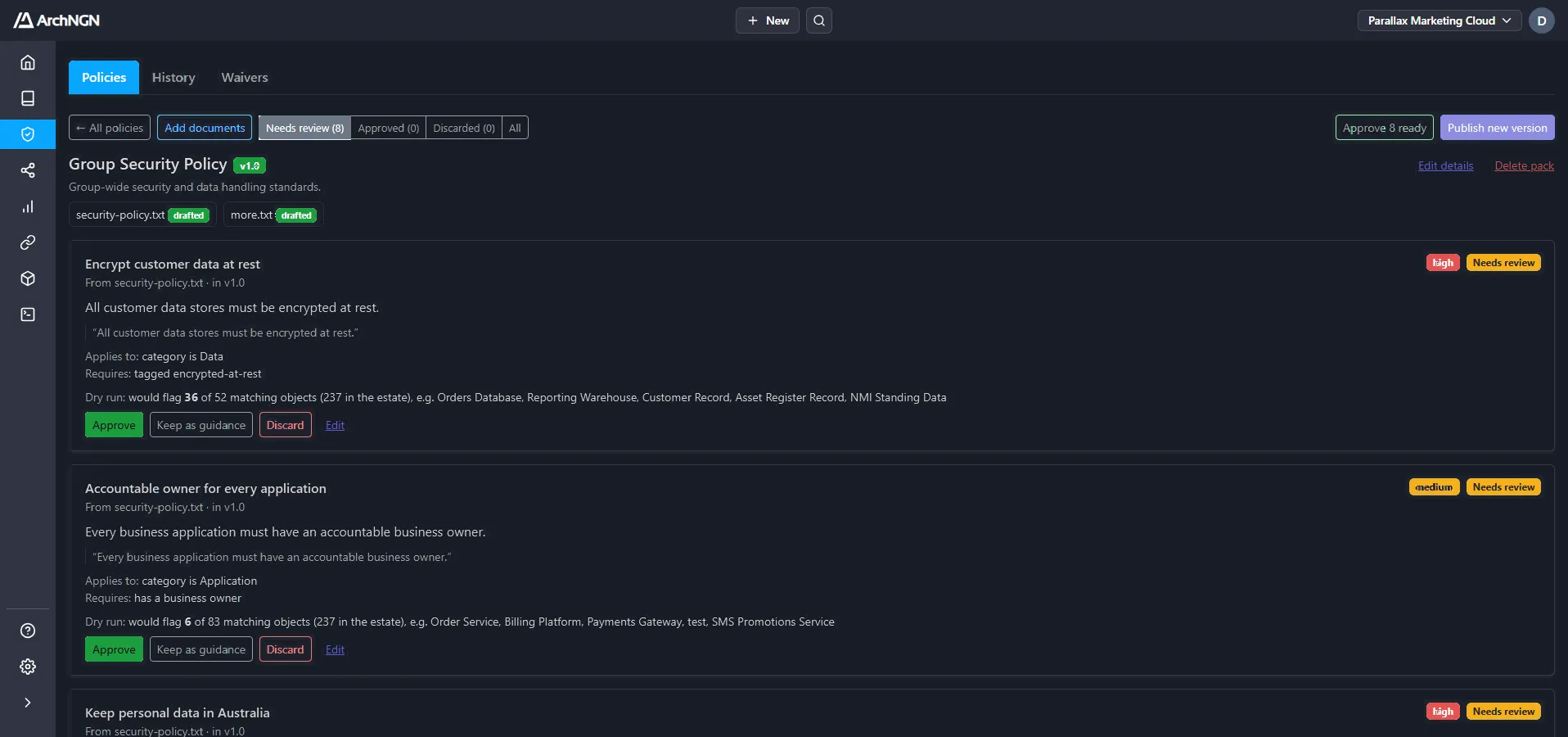
| Action | What it does |
|---|---|
| Approve | Publish the draft as a rule, or as guidance if it’s guidance only. Not available while the rule has problems. |
| Keep as guidance | Drop the rule and publish the policy as guidance only. |
| Discard | Publish nothing from this draft. |
| Reopen | Put a decided draft back in the queue. |
| Edit | Change the statement, the rule or its tags. The draft is re-validated and the dry run runs again. |
Approve N ready approves every draft in the queue that has no problems. You can publish once every draft has a decision.
Write or edit a rule by hand
Section titled “Write or edit a rule by hand”A rule is a small JSON object. You edit it in the Rule box when you click Edit on a draft, and you can rewrite it completely there. Leave the box empty to make the draft guidance only.
This reads: every Data object tagged personal-data must be tagged encrypted-at-rest.
Every rule has four parts:
| Key | Required | What it is |
|---|---|---|
severity | yes | high, medium or low. |
match | yes | Which objects the rule applies to. Every key must hold. Must not be empty: a rule that applies to everything is almost always a mistake. |
require | yes | What each matched object must satisfy. Every key must hold. |
message | yes | The finding text. {name}, {type} and {category} are replaced with the object’s values. Cite the policy so the reader can find it. |
The rule’s id is set by ArchNGN from the policy name and stays the same across versions, so you don’t write one.
match: which objects the rule applies to
Section titled “match: which objects the rule applies to”| Key | Value | Matches when |
|---|---|---|
category | a value or a list | the object’s category is one of them, e.g. "Data" or ["Application", "Technology"] |
type | a value or a list | the object’s type is one of them, e.g. "Data Store" |
criticality | High, Medium, Low, or a list | the object’s criticality is one of them |
lifecycleStatus | Invest, Maintain, Migrate, Eliminate, Tolerate, or a list | the object’s lifecycle status is one of them |
tags | a list of tags | the object carries every listed tag |
tags_any | a list of tags | the object carries at least one listed tag |
Categories and types are the ones in your account’s metamodel, including any added by an overlay.
require: what matched objects must satisfy
Section titled “require: what matched objects must satisfy”| Key | Value | Passes when |
|---|---|---|
fields_present | a list of fields | each field is filled in, e.g. ["businessOwner"] |
fields_in | { "field": [allowed values] } | each field holds one of the allowed values |
min_associations | a whole number, 1 or more | the object is linked to at least that many other objects |
tags_all | a list of tags | the object carries every listed tag |
tags_any | a list of tags | the object carries at least one listed tag |
tags_none | a list of tags | the object carries none of the listed tags |
The fields a rule can read are category, type, criticality, lifecycleStatus, businessOwner and technologyOwner. A blank field counts as missing.
min_associations is only checked in findings and design checks. It is never checked when an object is created or edited, because a new object has no links yet.
How tags are compared
Section titled “How tags are compared”- An object’s tags are the comma-separated values in its Tags field. Each tag is trimmed and compared without regard to case, so
Personal-Datamatchespersonal-data. - Tags are usually
key:valuepairs, such asretention:36morclassification:confidential. - A tag ending in
*matches any value with that prefix."tags_any": ["retention:*"]acceptsretention:36m,retention:7yand so on.
Examples
Section titled “Examples”An accountable owner on every high-criticality application:
A finite retention period on personal data, and never retention:indefinite:
Technology past end of life must be migrating or being eliminated:
Suppliers, whether tagged as a supplier or as a data processor, must have a completed assessment:
Custom tags
Section titled “Custom tags”When a policy needs a fact the shared tags don’t cover, a rule can declare its own tags. Declare them in the New tags box, as a tag and what it records:
Then use the tag in the rule:
A custom tag must be lower case, in key or key:value form, using letters, numbers and hyphens (the value may also use dots). It can’t reuse a shared tag, and it needs a meaning. A declared tag is approved with its rule, and once published it can be used by any rule in the same pack.
Validation problems
Section titled “Validation problems”A draft with problems can’t be approved until they are fixed. The messages say what to change, for example:
'Widget' is not a category: use a category from your metamodel.'owner' is not a field: use one of the six fields listed above.'data-residency:au' is not in the vocabulary; declare it in new_tags: add the tag under New tags, or use a shared tag.match must select some objects: add at least onematchkey.severity must be one of high, medium, low.
Setting up rules manually
Section titled “Setting up rules manually”Every rule belongs to a policy, so a rule you write yourself still starts from a policy statement. That keeps the reason for the rule with it wherever it’s reported. To set up rules by hand:
-
Write the policies down, one statement each. A plain text file is enough:
Or add each policy to the Reference Library as a policy or standard.
-
Create a pack from the file or the Reference Library items, as in Create a pack.
-
When the drafts arrive, click Edit on each one and write or replace its rule in the Rule box, using the syntax above. Declare any new tags under New tags.
-
Click Save and re-check, check the dry run, then Approve.
-
Publish the pack, and Enable it if it isn’t on yet.
Tag your objects
Section titled “Tag your objects”Rules can only see what is recorded. Most rules read tags, so the objects in your estate need the tags your rules ask about. Add them in the Tags field when you create or edit an object in the Repository, separated by commas:
Use the dry run to check coverage before you approve: a rule that matches no objects is usually waiting on tags that haven’t been added yet.
Publish, versions and states
Section titled “Publish, versions and states”Publish turns the approved drafts into a version of the pack: 1.0 first, then 1.1, 1.2 and so on each time you publish again. A published version never changes, so any finding can be traced to the rules that produced it. Publishing also:
- adds each approved policy to every workspace’s Reference Library as guidance (policies that came from the Reference Library are not copied again);
- keeps the states you’ve set when you publish a new version.
Publishing doesn’t turn the pack on. Every pack starts off: click Enable on its card under Customer Policies to check every workspace against it. Once a pack is enabled, each new version you publish is checked straight away.
Every pack is Advisory or Enforce, set with the Enforce switch on its card:
| State | What happens |
|---|---|
| Advisory | Violations are reported in Findings, on Home and in design checks, but nothing is blocked. |
| Enforce | Creating or editing an object that breaks a rule is refused, and a design check that breaks a rule fails unless the risk is accepted. |
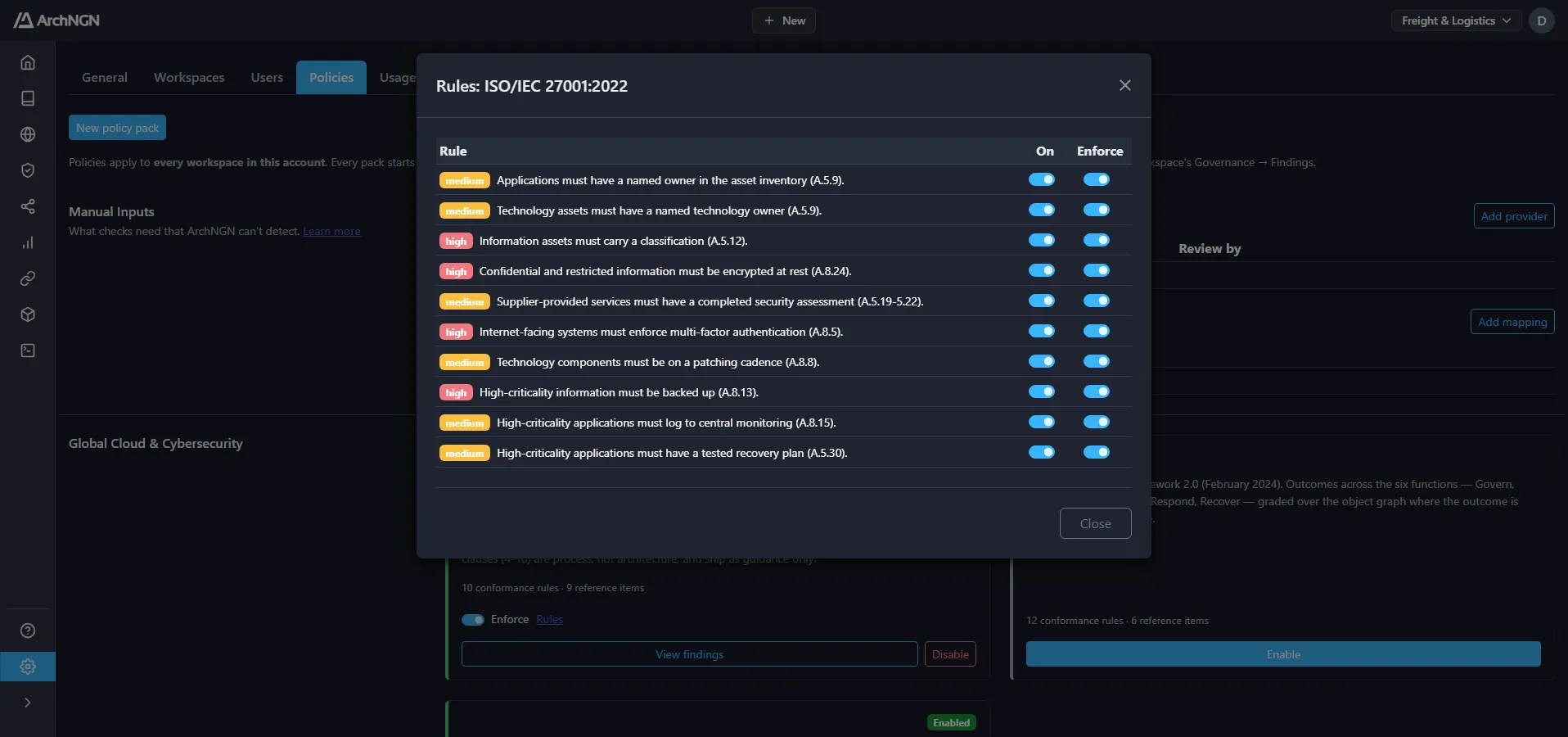
To stop checking a pack, click Disable on its card. Open Rules on a pack to adjust single rules: On switches a rule off without disabling the pack (you are asked why, and the rule is listed under Exceptions with the reason), and Enforce sets the rule differently from its pack. A rule follows its pack unless you set it differently, and setting it back to match the pack makes it follow the pack again.
Start at Advisory, watch what the rules flag, and switch to Enforce once the results are right.
Manage a pack
Section titled “Manage a pack”Open a pack from its card under Customer Policies:
- Edit details changes the pack’s name and description. Its rules only change through review.
- Add documents drafts more sources into the same pack.
- Delete pack removes the pack, its drafts and versions, and stops its rules being checked.
Shared tags
Section titled “Shared tags”These tags are understood by every pack, including ArchNGN’s frameworks. Tagging an object once answers every pack that asks the same question: encrypted-at-rest, for example, satisfies GDPR, the Australian Privacy Principles, ISO 27001, SOC 2, NIST CSF, PCI DSS, HIPAA and DORA rules alike. A tag shown as key:* accepts any value.
Privacy: whose data, and what kind
Section titled “Privacy: whose data, and what kind”| Tag | Records |
|---|---|
personal-data | Holds or processes information about an identifiable person. |
sensitive-data | Special-category (GDPR Art. 9) or sensitive (Privacy Act s 6) information: health, ethnicity, religion, sexuality, biometrics and the like, including when inferred. |
children-data | Holds information about children. |
subjects:eu | Data about individuals in the EU/EEA. |
subjects:au | Data about individuals in Australia. |
Privacy: collection and use
Section titled “Privacy: collection and use”| Tag | Records |
|---|---|
lawful-basis:* | GDPR Art. 6 basis: consent, contract, legal-obligation, vital-interests, public-task, legitimate-interest. |
consent:explicit | Explicit consent recorded (GDPR Art. 9(2)(a), APP 3.3). |
consent:parental | Consent given or authorised by a parent (GDPR Art. 8). |
consent:direct-marketing | Consent to direct marketing recorded for third-party-sourced data (APP 7.3). |
art9-condition:* | A GDPR Art. 9(2) condition other than explicit consent. |
app3-exception:* | An APP 3.4 exception for collecting sensitive information without consent. |
collection-point | Collects personal data directly from individuals (form, pixel, app). |
notice:provided | A privacy or collection notice is shown at collection. |
direct-marketing | Used to send direct marketing. |
opt-out:honoured | Opt-outs and marketing objections are captured and honoured. |
source:third-party-list | Personal data bought or received from a third party. |
profiling | Scores, segments or predicts behaviour of individuals. |
dpia:complete | A data protection impact assessment is complete. |
retention:* | Retention period, e.g. retention:36m. retention:indefinite fails every retention rule. |
dsar:supported | Reachable by the access, correction and erasure process. |
Privacy: transfers and processors
Section titled “Privacy: transfers and processors”| Tag | Records |
|---|---|
cross-border:eea | EU personal data leaves the EEA. |
cross-border:au | Australians’ personal information is disclosed overseas. |
safeguard:adequacy | Destination has an EU adequacy decision. |
safeguard:scc | EU standard contractual clauses in place. |
safeguard:bcr | Binding corporate rules in place. |
safeguard:app8-contract | Contract binding the overseas recipient to the APPs (APP 8.1). |
safeguard:app8-consent | Informed consent to overseas disclosure (APP 8.2(b)). |
safeguard:similar-law | Recipient is bound by a substantially similar law (APP 8.2(a)). |
processor:third-party | A third party processes personal data on our behalf. |
dpa:signed | A data processing agreement is signed (GDPR Art. 28). |
Security: classification and exposure
Section titled “Security: classification and exposure”| Tag | Records |
|---|---|
classification:* | Information classification: public, internal, confidential, restricted. |
internet-facing | Reachable from the public internet. |
customer-facing | Used directly by customers or the public. |
critical-function | Supports a critical or important function (DORA Art. 3(22)). |
Security: controls
Section titled “Security: controls”| Tag | Records |
|---|---|
encrypted-at-rest | Data is encrypted where it is stored. |
encrypted-in-transit | Traffic is encrypted with strong cryptography. |
mfa:enforced | Multi-factor authentication enforced for access. |
sso:integrated | Access goes through the corporate identity provider. |
logging:centralised | Security-relevant events reach central logging and monitoring. |
vuln-scan:* | Vulnerability scanning cadence, e.g. vuln-scan:quarterly. |
patching:* | Patching cadence, e.g. patching:monthly. |
network-segmented | Isolated from other networks by enforced controls. |
change-control:enforced | Changes go through review and approval before production. |
risk-assessment:complete | A current security risk assessment covers this asset. |
incident-runbook | An incident response runbook covers this asset. |
Resilience
Section titled “Resilience”| Tag | Records |
|---|---|
backup:* | Backup cadence, e.g. backup:daily. |
backup:tested | Restores from backup are tested. |
dr:tested | Disaster recovery or continuity plan is tested. |
resilience-test:* | Digital operational resilience testing, e.g. resilience-test:2026. |
Suppliers
Section titled “Suppliers”| Tag | Records |
|---|---|
supplier:third-party | Provided or operated by a third party. |
supplier-assessment:complete | Supplier security due diligence is complete and current. |
register-of-information | Recorded in the DORA register of ICT third-party arrangements. |
contract:dora-art30 | Contract carries the DORA Art. 30 key provisions. |
exit-plan:documented | A tested exit strategy exists for the supplier. |
Payments (PCI DSS)
Section titled “Payments (PCI DSS)”| Tag | Records |
|---|---|
pci:cde | In the cardholder data environment, or connected to it. |
cardholder-data | Stores, processes or transmits primary account numbers. |
stores:sad | Retains sensitive authentication data (CVV, PIN, full track) after authorisation. |
pan:tokenised | PAN replaced by a token where stored. |
pan:truncated | PAN truncated where stored. |
pci-aoc:current | Service provider’s PCI DSS attestation of compliance is current. |
Health (HIPAA)
Section titled “Health (HIPAA)”| Tag | Records |
|---|---|
phi | Holds electronic protected health information. |
baa:signed | A HIPAA business associate agreement is signed. |
AI (ISO/IEC 42001)
Section titled “AI (ISO/IEC 42001)”| Tag | Records |
|---|---|
ai-system | An AI system: a model, or a service built on one. |
automated-decision | Makes or drives decisions about people without a person deciding. |
ai-impact-assessment:complete | AI system impact assessment is complete. |
training-data:documented | Provenance and quality of training and fine-tuning data are documented. |
ai-validation:complete | Verified and validated against its requirements before release. |
ai-monitoring:enabled | Performance, drift and misuse are monitored in operation. |
ai-transparency:disclosed | Users are told they are dealing with an AI system and its limits. |
human-oversight | A person can review, override or stop its decisions. |
Technology lifecycle
Section titled “Technology lifecycle”| Tag | Records |
|---|---|
eol:* | End-of-life status: eol:passed, eol:within-12m, eol:none-announced. |
support:* | Support status: support:vendor, support:extended, support:community, support:none. |
migration:planned | A funded plan to migrate off this technology exists. |
exception:approved | An approved, time-bound exception covers this asset. |
Related
Section titled “Related”- Frameworks: ready-made packs, such as ISO 27001, SOC 2 and GDPR.
- Reference Library: where published policies land as guidance, and a source for new packs.
- Design checks: where Enforce rules gate pipelines and coding agents.
- Objects and associations: the fields and tags rules read.